Genbeya
Genbeya gives one Git repository a wiki, a task board, a code editor, Git tools and a terminal, in one desktop window. Everything it shows is a plain file in the repository — Markdown pages, one Markdown file per task, .genbeya.yml for settings — so it works with any Git host and any other tool, and your project’s knowledge travels with its code.
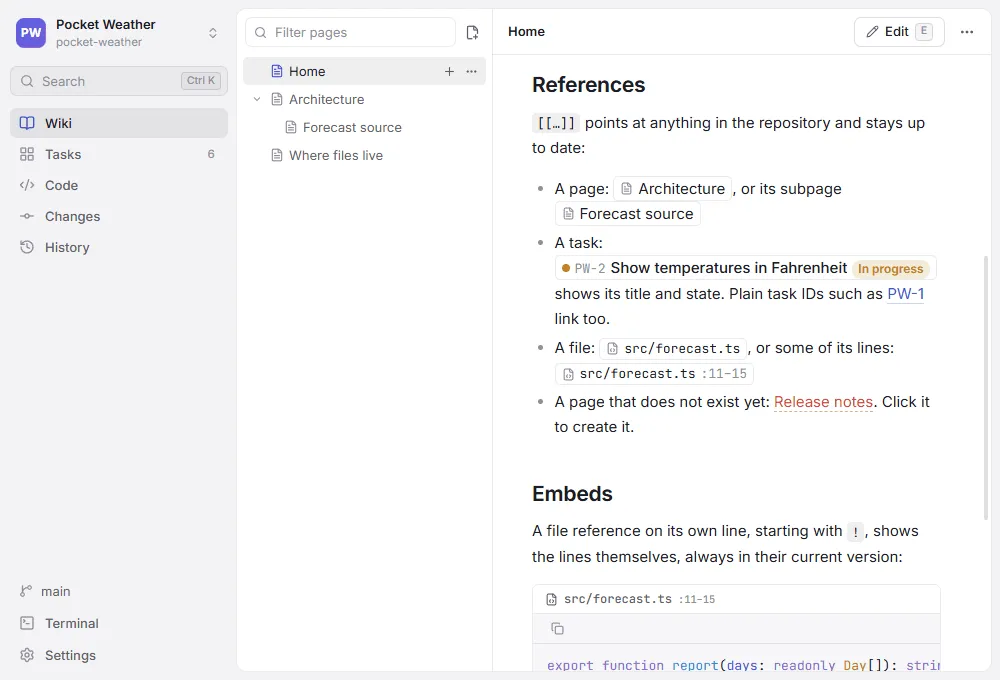
A quick tour
Section titled “A quick tour”| Area | What you do there | Stored as | Read more |
|---|---|---|---|
| Wiki | Write pages with a live preview, diagrams and callouts | Markdown files in docs/ | Wiki |
| References | Link tasks, pages and files with [[…]], shown with live titles and states | Plain text in any page, task or comment | References |
| Tasks | Plan on a board or a list, with types, epics, custom fields, comments and activity | One Markdown file per task in tasks/ | Tasks |
| Code | Edit any file of the repository | The repository itself | Code |
| Search | Find text in pages, tasks and code | — | Search |
| Version control | Commit, branch, merge, rebase, stash and resolve conflicts | Git | Version control |
| Terminal | A shell in the repository, wherever it lives | — | Terminal |
| Sharing | Send a link that opens a page, task, file or commit in a coworker’s Genbeya | — | Sharing |
| AI agents | Teach coding agents to work with the tasks and the wiki | Skill and instruction files | AI agents |
| Settings | Folders, task prefix, workflow, types, fields | .genbeya.yml | Settings |
Repositories can live on this computer, in WSL or on an SSH server; Git always runs where the repository is.
By default, wiki pages, tasks and settings change with the branch you have checked out, like code. A team working on many branches can keep any of them on a shared Content branch instead — for example just the tasks, so everyone sees the same board while the documentation stays with the code.
Why plain files
Section titled “Why plain files”- Reviewable. A changed task or page is a diff in a pull request, next to the code it describes.
- Linked.
[[GENBEYA-14]]in a page shows the task’s title and current status, a missing page shows red, and moving a page updates the links to it — see References. - Yours. No server, no account, no database. Any editor, script or coding agent can read and write the same files.
Start here
Section titled “Start here”- Getting started — install, open a repository locally, on WSL or over SSH, and try the sample project
- Guide — how to use each area
- Keyboard shortcuts — every key on one page
- Architecture — how the app is put together, for contributors
- Development — build, test and package