Wiki & references
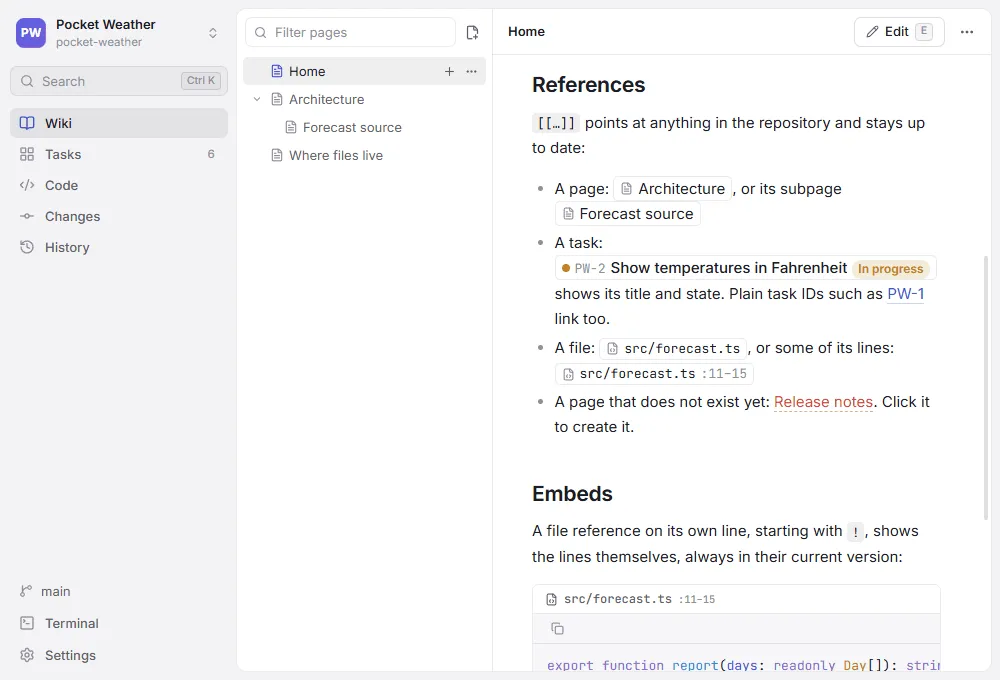
Nested pages with a live preview, diagrams, math and callouts. [[GENBEYA-12]],[[Page title]] or [[src/app.ts#L10-L20]] link tasks, pages and lines of code, and show their live title and status.
Docs · Tasks · Decisions · Code
Genbeya puts your whole project — docs, tasks, decisions and code — into the Git repository, as plain files you can version, review and use anywhere.
Windows · macOS · Linux — no account, no server
01 The obeya
In lean, the obeya is the big room where plans, tasks, problems and status hang on the walls for everyone to see. Genbeya builds that room inside your repository: a wiki, a task board, a code editor, Git tools and a terminal, in one window.
02 The wiki wall
Your wiki is Markdown in docs/, next to the code it explains — changed in the same commit, reviewed in the same pull request. References link pages, tasks and lines of code, and always show their current title and status.
[[GENBEYA-12]]GENBEYA-12Virtualize long listsIn progress03 The back wall
Every page, task and decision is versioned by Git: see who changed what and why, review it like code, and take back anything. And Genbeya is a full Git client — stage single lines, rebase interactively, resolve conflicts.
a3f9c1e Document the release flow docs7b2e0d4 GENBEYA-12: Virtualize the file tree taskse91c5a2 Decide on plain files for settings decision04 The task wall
One Markdown file per task, with a readable ID and front matter. Plan on a board or a list, with epics, custom fields and comments — and grep, diff and merge your backlog like everything else.
---id: GENBEYA-12title: Virtualize long listsstatus: in-progresslabels: [performance]---05 The floor
Everyone works in the same room — your coding agents too. They read the same docs and tasks you do, and a skill and an AGENTS.md section teach Claude Code, Codex, Copilot and Cursor to track their work as tasks and keep knowledge in the wiki.
06 Plain files
No server, no account, no database. It is Markdown and YAML in your repository, so it works with any Git host, any editor and any tool — today and in ten years.
Inside the room
A wiki, a task board, a code editor, Git tools and a terminal — working on the same plain files your team and your tools already use.
Nested pages with a live preview, diagrams, math and callouts. [[GENBEYA-12]],[[Page title]] or [[src/app.ts#L10-L20]] link tasks, pages and lines of code, and show their live title and status.
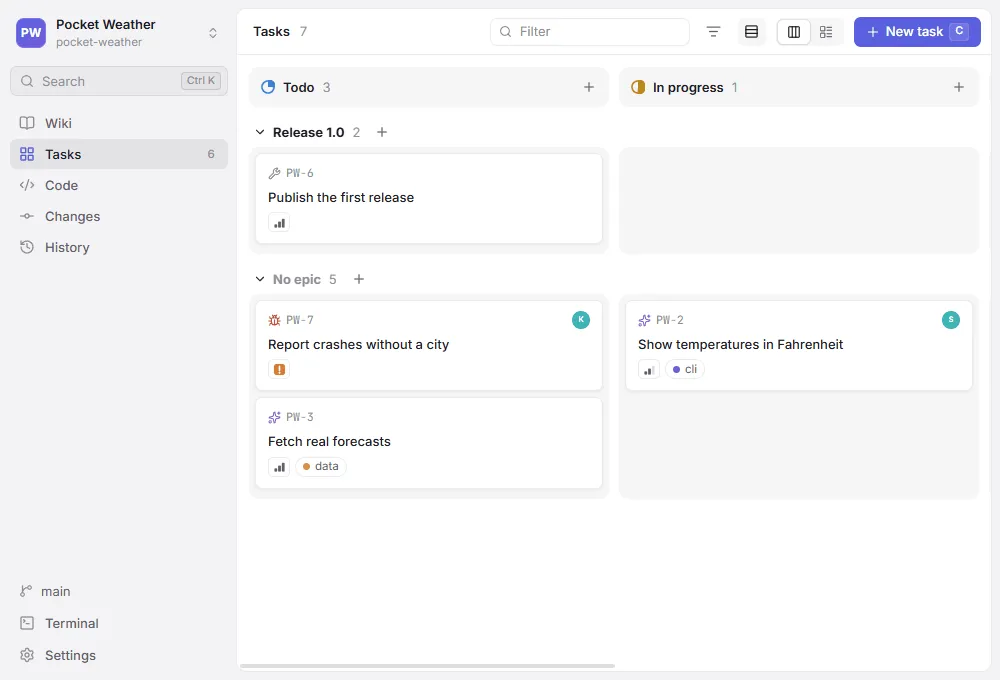
A board or a list with readable IDs, drag and drop, task types, custom fields, templates, epics as swimlanes, comments — and activity read from Git history.
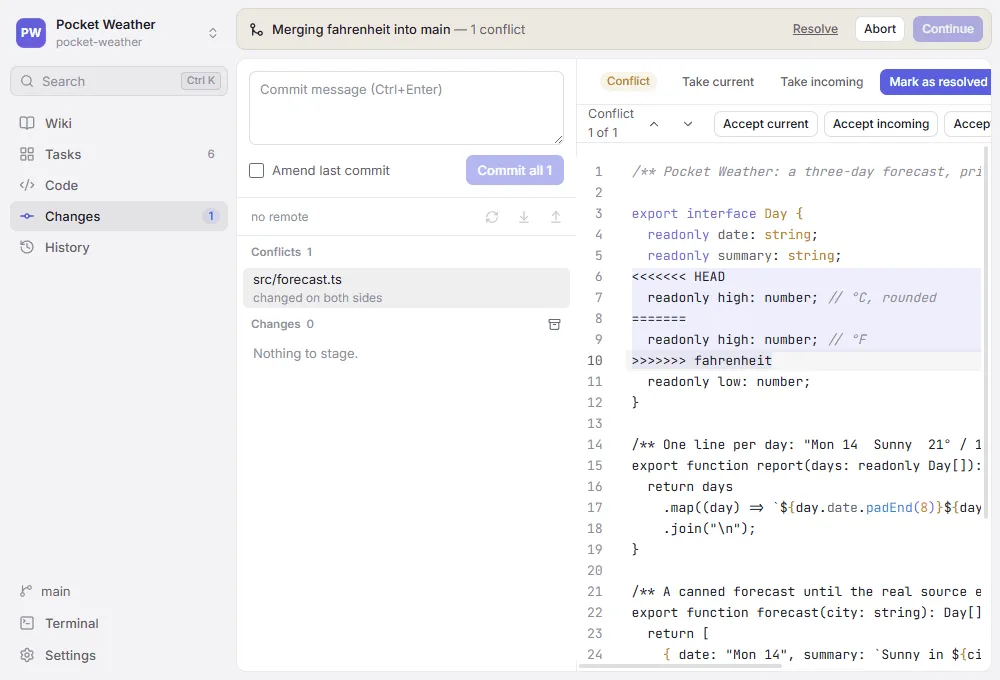
Stage single lines, commit and amend. Branches, tags and stashes; merge, rebase (interactively too), cherry-pick and revert — with conflict resolution in the app and a commit graph of every branch.
A skill and an AGENTS.md section teach coding agents to track their work as tasks and keep project knowledge in the wiki. They read the same files you do.
CodeMirror with find and replace, several cursors, folding, coloured bracket pairs and a minimap.
Pages, tasks and code in one search (Ctrl+Shift+F), powered by git grep.
Repositories on this computer, in WSL or over SSH, with a remote folder browser. Git runs on that machine.
A shell in the repository (Ctrl+`), on the machine it lives on.
Copy a link that opens a page, task, file or commit in a coworker's Genbeya, or on your Git host.
Keep the wiki, the tasks or the settings on a shared branch, so they look the same on every code branch.
How it works
There is no database to set up and nothing to export. Genbeya reads and writes plain files in the repository you already have.
On this computer, in WSL or over SSH. No setup: the wiki is docs/ and the tasks are tasks/ until you say otherwise.
Genbeya saves what you do as Markdown and YAML. Everything it shows is a file you could have written yourself.
Docs and tasks travel with the code: in the same commits, through the same pull requests, to any Git host.
.genbeya.yml
name: Pocket Weather
taskPrefix: PW
statuses: [todo, in-progress, review, done]
Why Genbeya?
The name joins two words from lean manufacturing.
現場
Where value is actually created. Lean's advice is to go to the genba and see for yourself, instead of reading reports somewhere else.
大部屋
The project room, where plans, tasks, problems and status hang on the walls for everyone to see.
Genbeya is the big room at the real place: everything about a project — docs, tasks, decisions, code and history — kept right where the work happens, in the repository. Versioned, reviewable, and open to every tool and person that can read files.Say it “gen-BEH-ya”.
Where it's going
The files are the product. The desktop app is the first way to work with them — not the only one, and never a place your project is locked into.
Windows, macOS and Linux — Electron, Tauri or Deno Desktop.
AvailableThe wiki and the board next to your code, in the editor you use.
PlannedAI agents read and update pages and tasks through the Model Context Protocol.
PlannedThe whole app as a demo that runs in the page.
AvailableGitHub, GitLab, Gitea and Bitbucket: references and boards where you review code.
PlannedIt's Markdown and YAML. grep, sed, your editor and your agent already work.
AvailableOpen a repository you already have. Nothing to set up, nothing to sign up for, nothing to migrate back out.